

Say goodbye to chore charts, forever
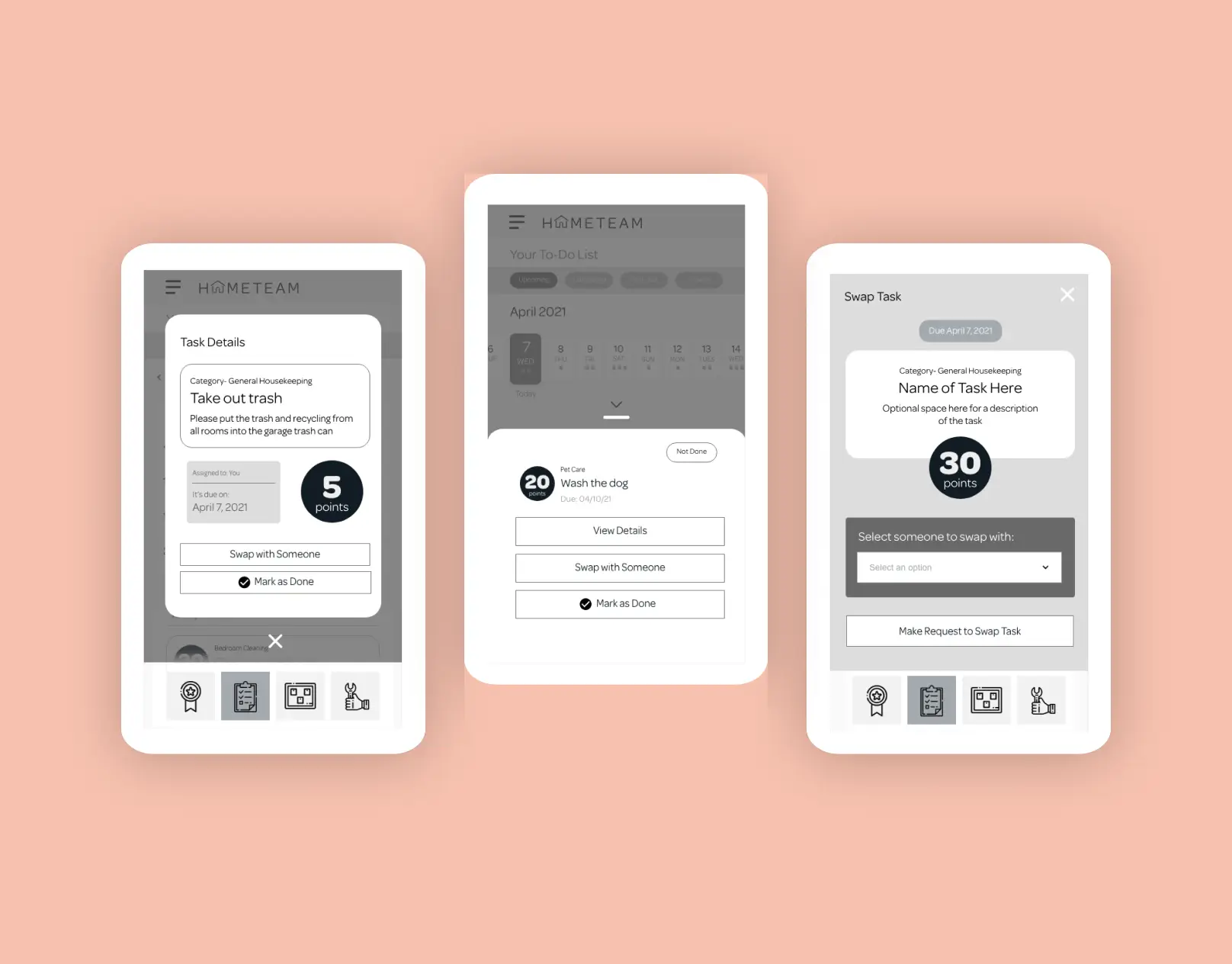
This visually-engaging family chore management app transformed insights from real families into a user-centered digital product that bridges the gap between parents and children through thoughtful interface design and gamification.
The challenge
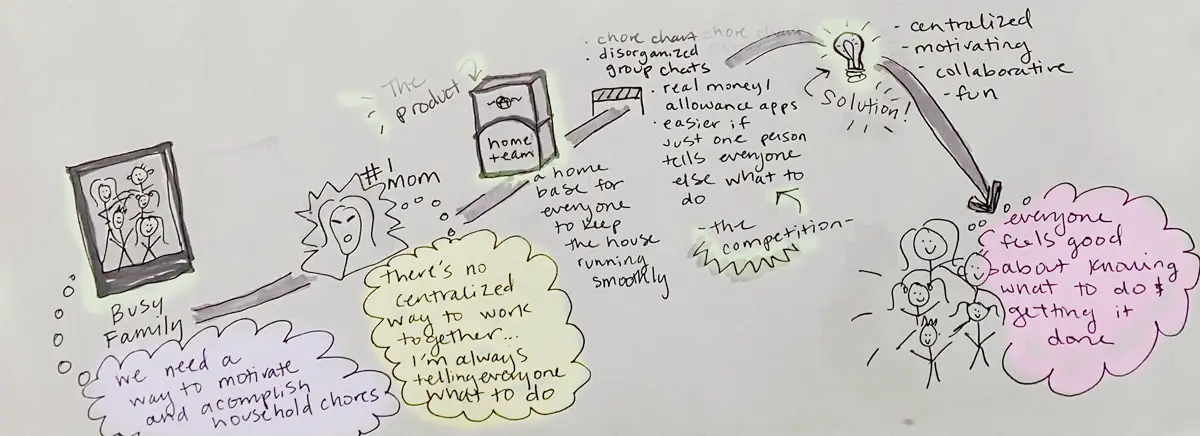
Families struggle with managing household chores and motivating children to participate in household responsibilities amid competing priorities and distractions. Existing solutions failed to:
- Create meaningful connections between parents and children around household responsibilities
- Provide age-appropriate motivation systems beyond simple financial rewards
- Offer intuitive interfaces that both parents and children could easily navigate
- Make chore management feel less like a burden and more like a collaborative family activity
My role on the project
As the UX designer focused on chore management functionality, I:
- Conducted competitive analysis and user interviews with families
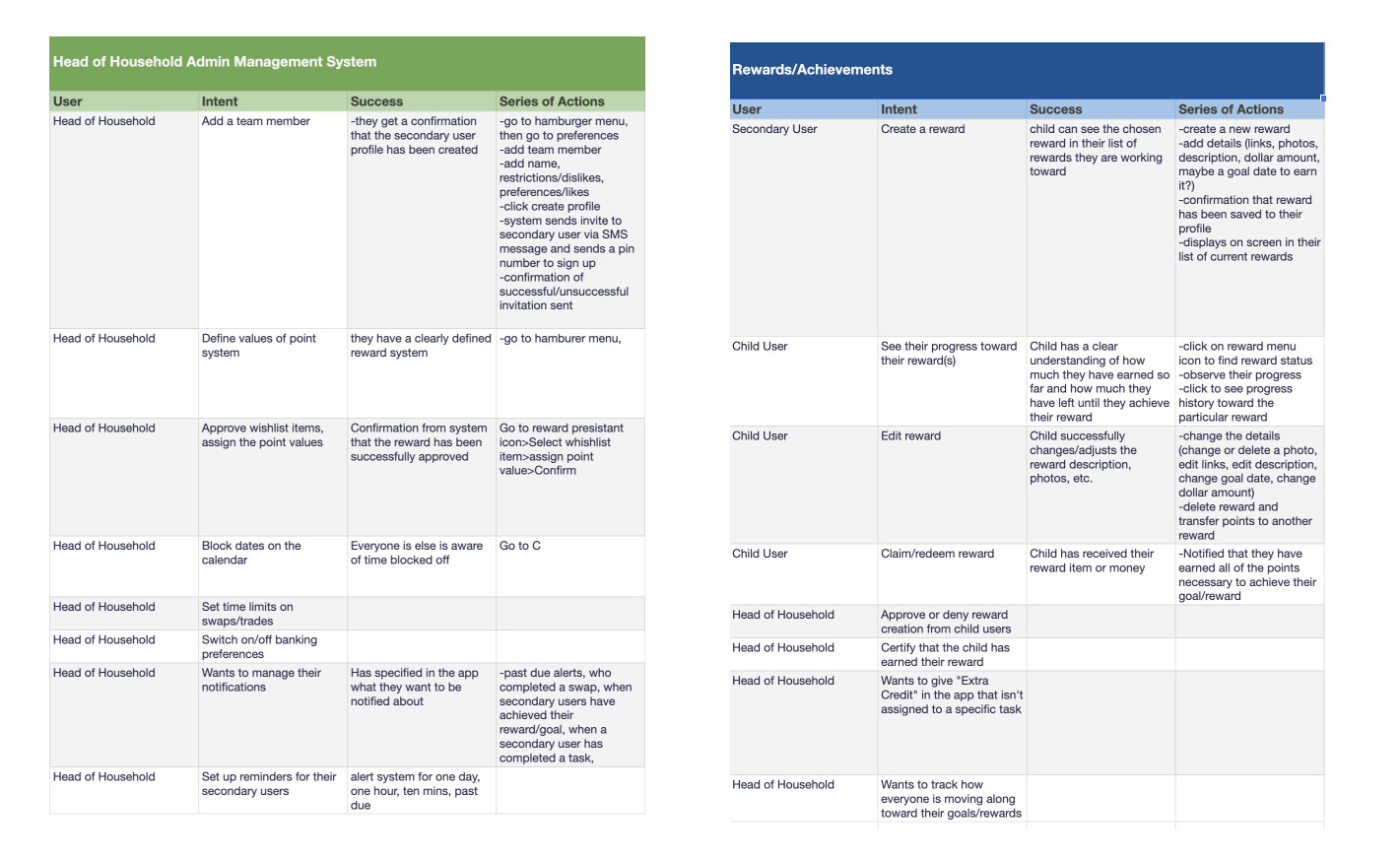
- Created user flows for core chore tracking and management features
- Designed and iterated on low, mid, and high-fidelity prototypes
- Developed a custom calendar interface for visualizing chore schedules
- Built a comprehensive design system emphasizing accessibility for all family members
- Led usability testing sessions with children and parents
- Create meaningful connections between parents and children around household responsibilities
- Provide age-appropriate motivation systems beyond simple financial rewards
- Offer intuitive interfaces that both parents and children could easily navigate
- Make chore management feel less like a burden and more like a collaborative family activity
- Created basic user interface sketches for primary chore management screens
- Tested these with children to gauge their understanding of the concept
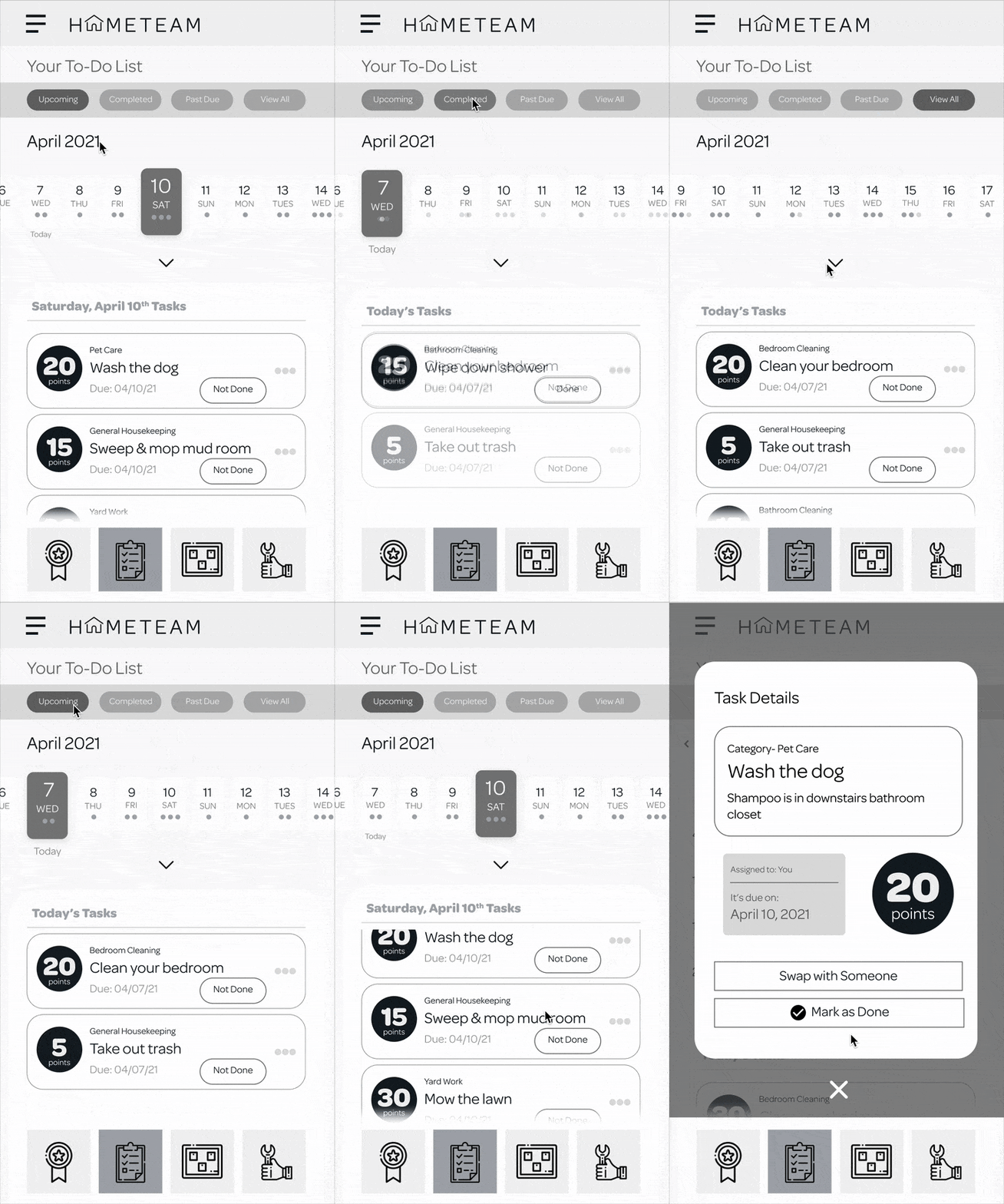
- Discovered that children responded well to the calendar idea but needed clearer visual indicators
- Added filtering options for upcoming, completed, and incomplete chores
- Implemented chore card components with management controls
- Conducted moderated usability tests to validate solutions
- Developed a custom color palette that appealed to both children and parents
- Created a typography scale for clear information hierarchy
- Designed responsive components optimized for touch interfaces
- Built a cohesive design system that reflected the project’s guiding principles
- Visual indicators clearly distinguish completed, upcoming, and overdue tasks
- Filtering options allow users to quickly find relevant information
- Interactive chore cards provide easy access to management options
- Designed a system allowing children to create their own meaningful rewards
- Integrated reward progress tracking directly into the chore management view
- Created visual indicators to show progress toward chosen goals
- Color palette and typography reflecting the playful yet purposeful nature of family collaboration
- Modern iconography and imagery aligned with children’s digital expectations
Research & Discovery

Competitive Analysis
Identified “table stakes” features among existing solutions and gaps in the market
User interviews
Conducted multiple rounds with families, focusing on households with multiple children
Feature prioritization
Used research to differentiate between expected features (reward systems, multiple users, notifications) and unnecessary ones (geo-tagging, photo galleries, tutorials)
Usability testing
I conducted moderated usability sessions with families to validate core functionality and identify friction points. Participants ranged from children (ages 8-14) to parents, providing invaluable insights that directly shaped our calendar interface and reward system.
Key Insight
Electronic money is abstract to children—they need tangible, meaningful rewards that feel real and attainable to stay motivated.
User Flow Development
I created detailed user flows to map how family members would interact with the chore management system, helping both the product team and users understand the system’s functionality. These flows became the foundation for the initial prototype designs.
Design Evolution
Low-fidelity prototyping
Initial wireframes focused on core functionality and helped validate the concept with users.
Mid-fidelity prototyping
This phase revealed that users needed more flexibility in how they viewed and interacted with chores, leading to the development of multiple calendar views and enhanced filtering options.
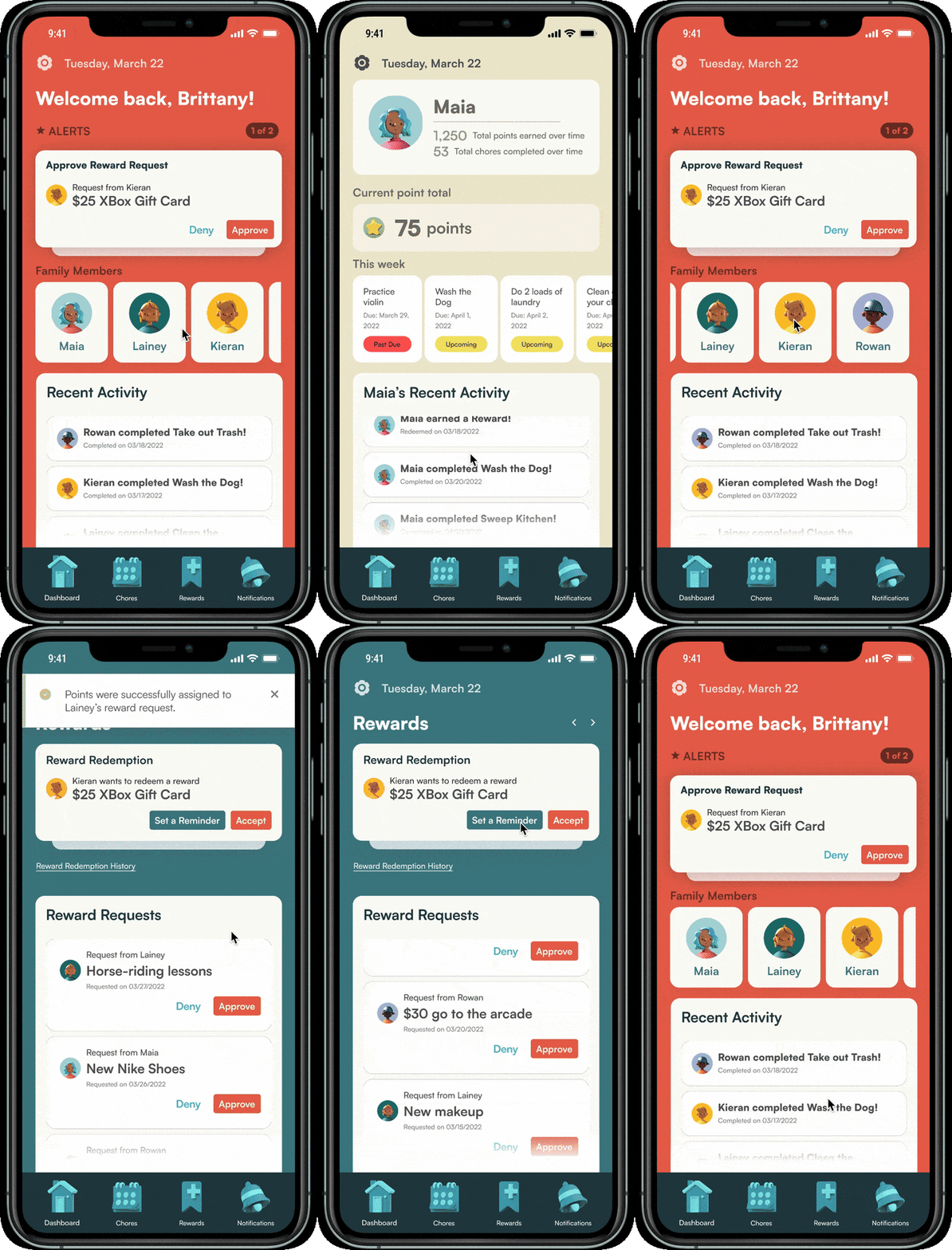
High-fidelity prototyping
The final design phase transformed the validated user experience into a visually engaging interface.
Design System
https://www.meganderrick.com/wp-content/uploads/2025/05/Screen-Recording-2025-05-05-at-2.59.53 PM.mov
View Design system on figma
Core Features & Components
Intuitive Calendar Interface
I designed the calendar feature to solve the core organizational challenge:
Customizable Reward System
Research showed that children needed more than just monetary incentives:
Comprehensive Design System
The final design embodied the project’s guiding principle: creating a strong connection between parents and children:
The Homies app successfully bridges the gap between parents and children by transforming chore management from a point of conflict into an opportunity for collaboration, creating a more harmonious and organized household experience.
Learnings
This project demonstrated the power of thorough user research and iterative design in creating solutions for complex family dynamics.
Testing
Iterative testing confirmed that children respond better to visual organization systems than text-heavy interfaces
Research
The research-driven approach revealed unexpected insights about children’s motivations and parents’ needs
Consistency
Building a dedicated design system ensured consistency while addressing the unique needs of a multi-generational user base
Refine
The evolution from low to high fidelity showcased how initial concepts can be refined through consistent user feedback